
You made the edit. The copy is sharper, the new section looks great, the page is done. Then a Slack message pulls you away, and the change sits in preview for three days because nobody hit publish.
If that has never happened to you, you are a more disciplined person than most of us. Between juggling campaigns, calls, and a dozen half-finished tabs, the last click is the one that quietly gets dropped — and the polished work never reaches a single visitor.
Today we’re fixing that with auto-publish.
What it does
Turn on auto-publish for a site, and Ploy publishes every change the moment it finishes it. No separate step, no “did that go live?” No work stranded in preview. You make the change; it ships.
And you decide how far each change goes with two modes:
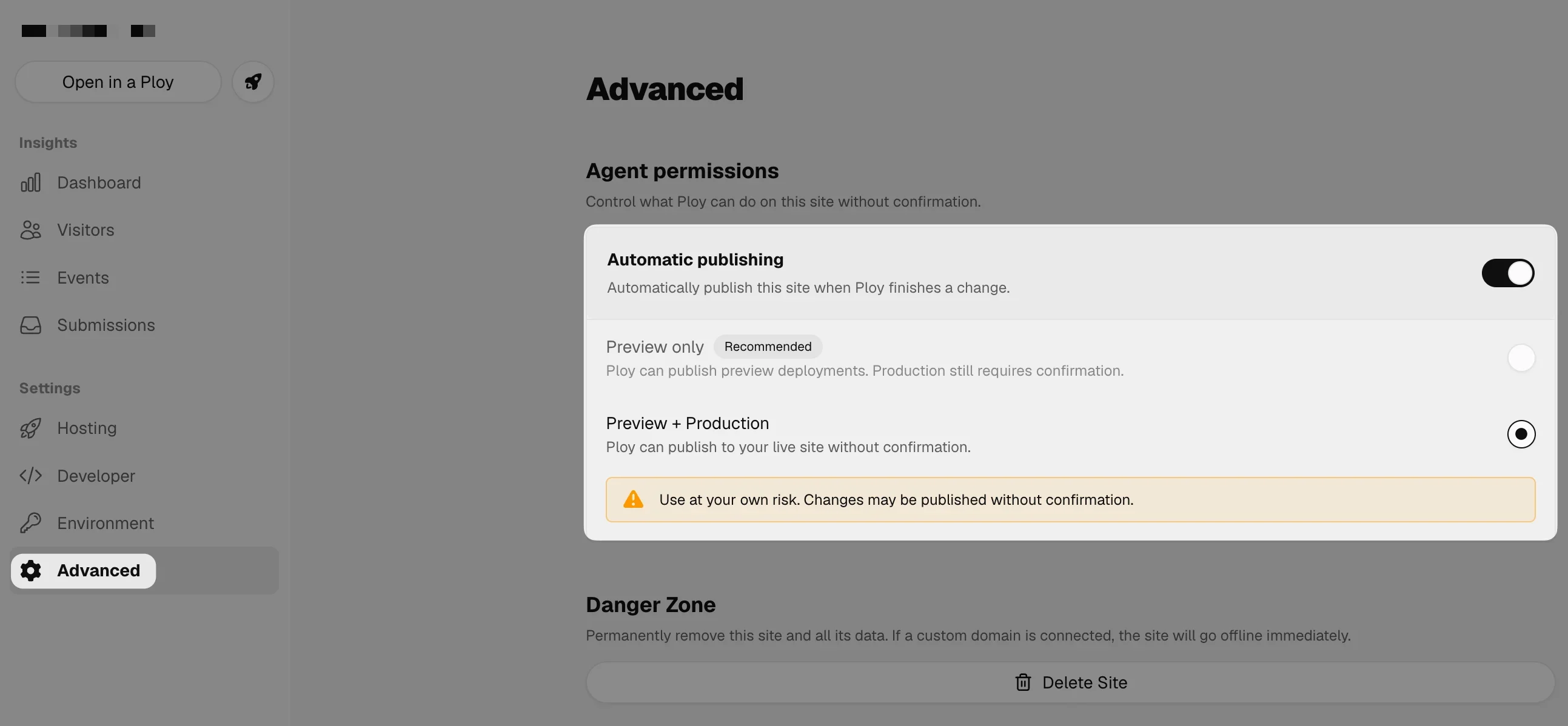
- Preview only (recommended) — Ploy publishes preview deployments automatically, so your work is always shareable and up to date. Going live on production still requires your confirmation.
- Preview + Production — Ploy publishes straight to your live site without confirmation. The fastest path from finished to live, for when you want zero friction.
How to turn it on
Auto-publish is a per-site setting, so you decide site by site:
- Open your site dashboard and go to Advanced.
- Under Agent permissions, flip Automatic publishing on.
- Choose your mode: Preview only or Preview + Production.
That’s it. From then on, when Ploy finishes a change on that site, it publishes to the level you picked.
When to use it — and when not to
Auto-publish is built for momentum, and the two modes let you dial in how much:
- Preview only is the sweet spot for most teams. Your preview always reflects your latest work — nothing gets stranded — while a human still signs off before anything hits production. It’s why we recommend it.
- Preview + Production is for when you want the finished work in front of visitors the instant it’s done, and you trust the flow enough to skip the confirmation step.
And you can always keep auto-publish off entirely when you want a fully manual gate — nothing ships until you click Publish or ask Ploy to publish. Either way, you’re in control of the trade-off.
You’re never locked in
Shipping fast only works if it’s safe to be wrong. Every publish in Ploy is a versioned, immutable deploy, so nothing is one-way. If a change goes live that you’d rather pull back, open Deploys in your site dashboard, find an earlier version, and click Promote. Rollbacks are instant — the previous version is already built and cached, so there’s no rebuild step.
The best change is the one your customers actually see. Auto-publish makes that the default, so the work you finish is the work that goes live.
Read more in the publishing docs.